 Matt の 小天地
用 Docker BuildKit 替換 Kaniko
Kaniko 已停止維護?如何以 Docker BuildKit 取代。從原理、cache 機制到 GitLab CI 實作範例。
TL;DR
原本使用的 Kaniko 已經 Archived
Survey Dcoker BuildKit
包含 Command Line, Cache, GitLab-CI 與相關設定
Docker BuildKit 概觀
BuildKit 相比傳統 Docker 的優化
可以處理更複雜的情境,包含
- 跳過未使用的 Stage
- 平行打包無相依性的 Stage
- 僅同步有異動的檔案至 Stage
- 僅同步
build context內有被使用到的檔案
BuildKit 是什麼?
BuildKit 是 Low-Level Build(LLB)
例如 Dockerfile 或 Mockerfile 都經過編譯成 LLB 後,才實際執行打包建構
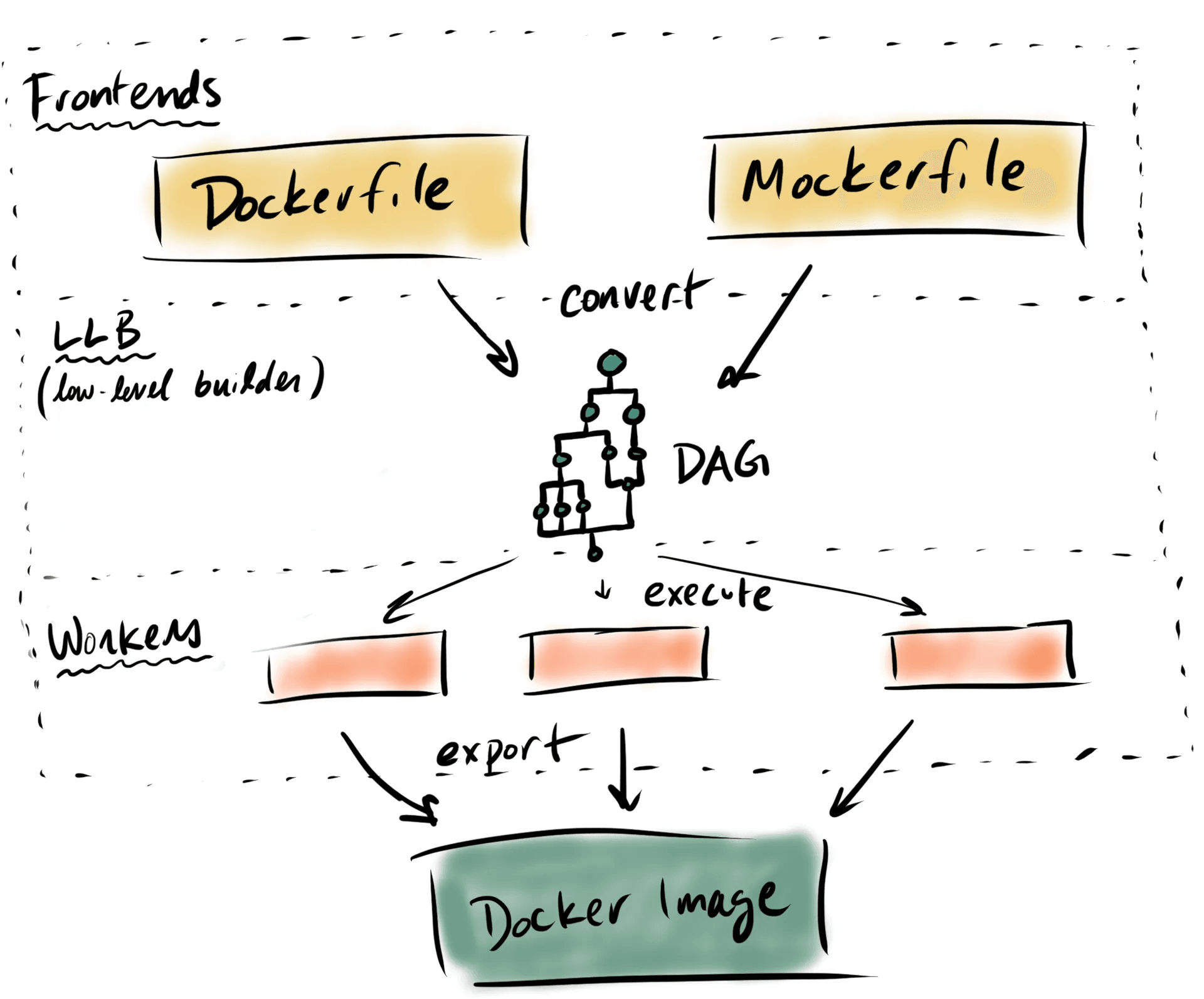
三種 Docker build 指令比較
- docker buildx build
- 其中最 High-Level 的指令
- ❌ 需要 Daemon
- ❌ 不支援 root-less
- buildctl build
- 比起 docker build 稍為更低階一點
- ❌ 需要 Daemon
- ❌ 不支援 root-less
- buildctl-daemonless.sh build
- 其中最低階
- ✅ 無需 Daemon
- ✅ 支援 root-less
##### 指令範例 #####

# Traditional Docker
docker buildx build -t myimage:latest . --push

# buildctl
buildctl build \
    --frontend dockerfile.v0 \
    --local context=. \
    --local dockerfile=. \
    --output type=image,name="myimage:latest",push=true

# daemonless
buildctl-daemonless.sh build \
    --frontend dockerfile.v0 \
    --local context=. \
    --local dockerfile=. \
    --output type=image,name="myimage:latest",push=true
Cache 機制
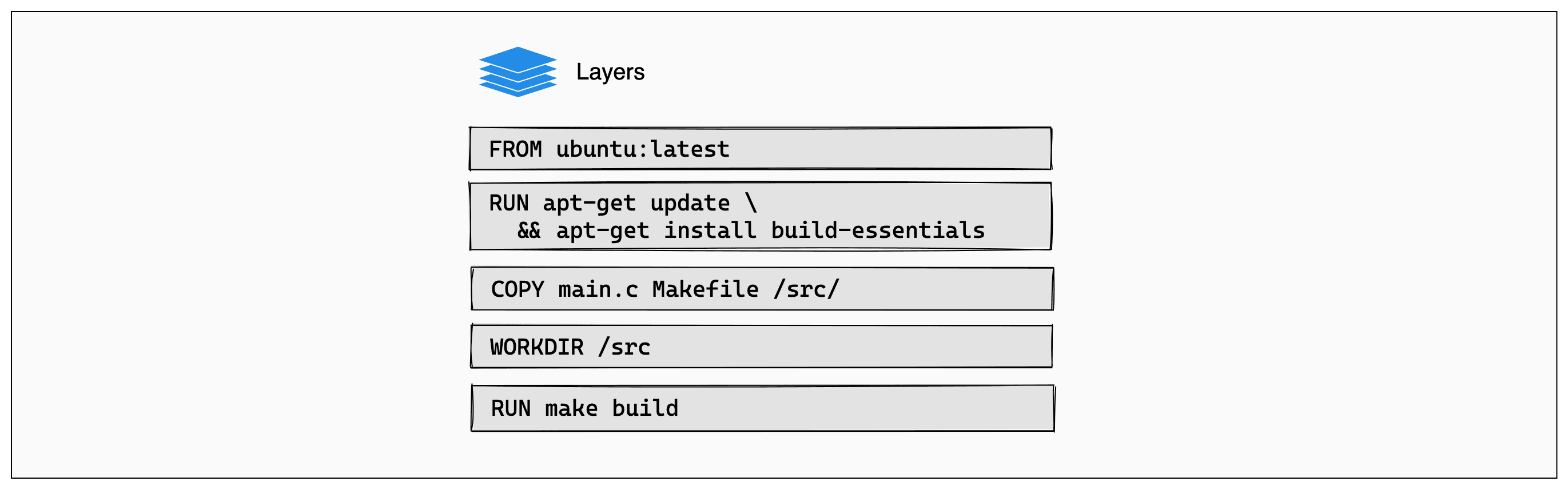
# syntax=docker/dockerfile:1
FROM ubuntu:latest

RUN apt-get update && apt-get install -y build-essentials
COPY main.c Makefile /src/
WORKDIR /src/
RUN make build
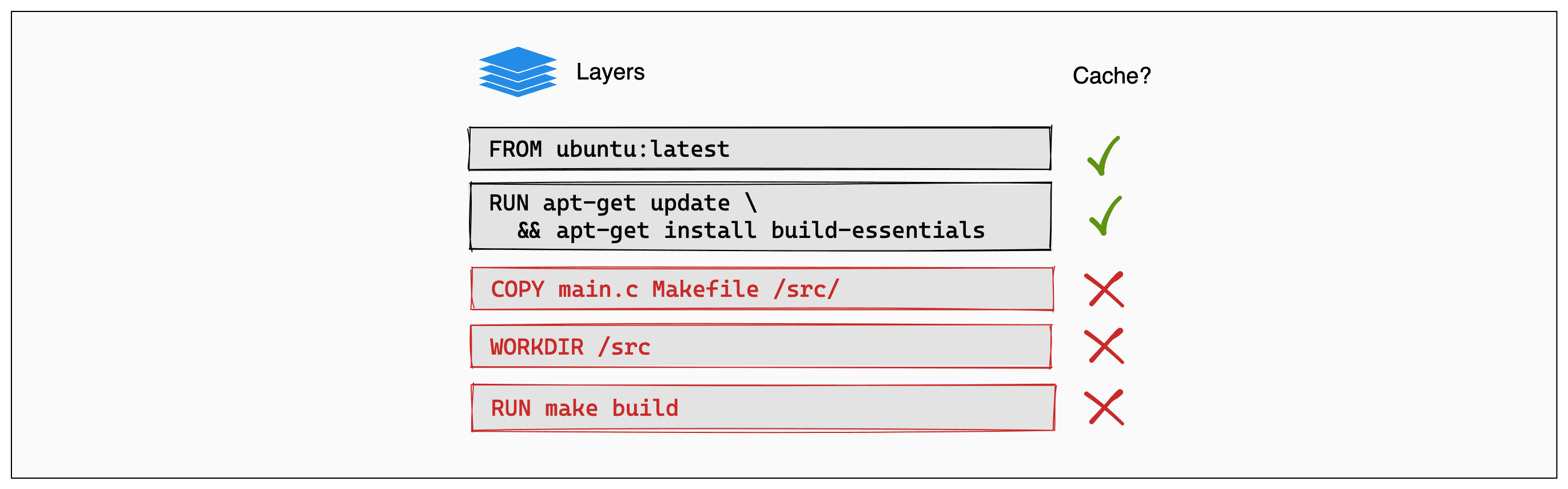
當有任何一個 Layer 的內容變動,該 Layer 與後續 Layer 會需要 re-build
 例如
例如 main.c 的內容異動 → COPY 之後的 Layer 皆需 re-build
指令範例
##### 一般情境 #####
tree
.
├── main.c
├── Makefile
└── Dockerfile

buildctl-daemonless.sh build \
    --frontend dockerfile.v0 \
    --local context=. \
    --local dockerfile=. \
    --output type=image,name="myimage:latest",push=true


##### 當 Dockerfile 不在 root #####
tree
.
├── build
│   └── Dockerfile
├── main.c
└── Makefile

buildctl-daemonless.sh build \
    --frontend dockerfile.v0 \
    --local context=. \
    --local dockerfile=. \
    --opt filename=build/Dockerfile \
    --output type=image,name="myimage:latest",push=true

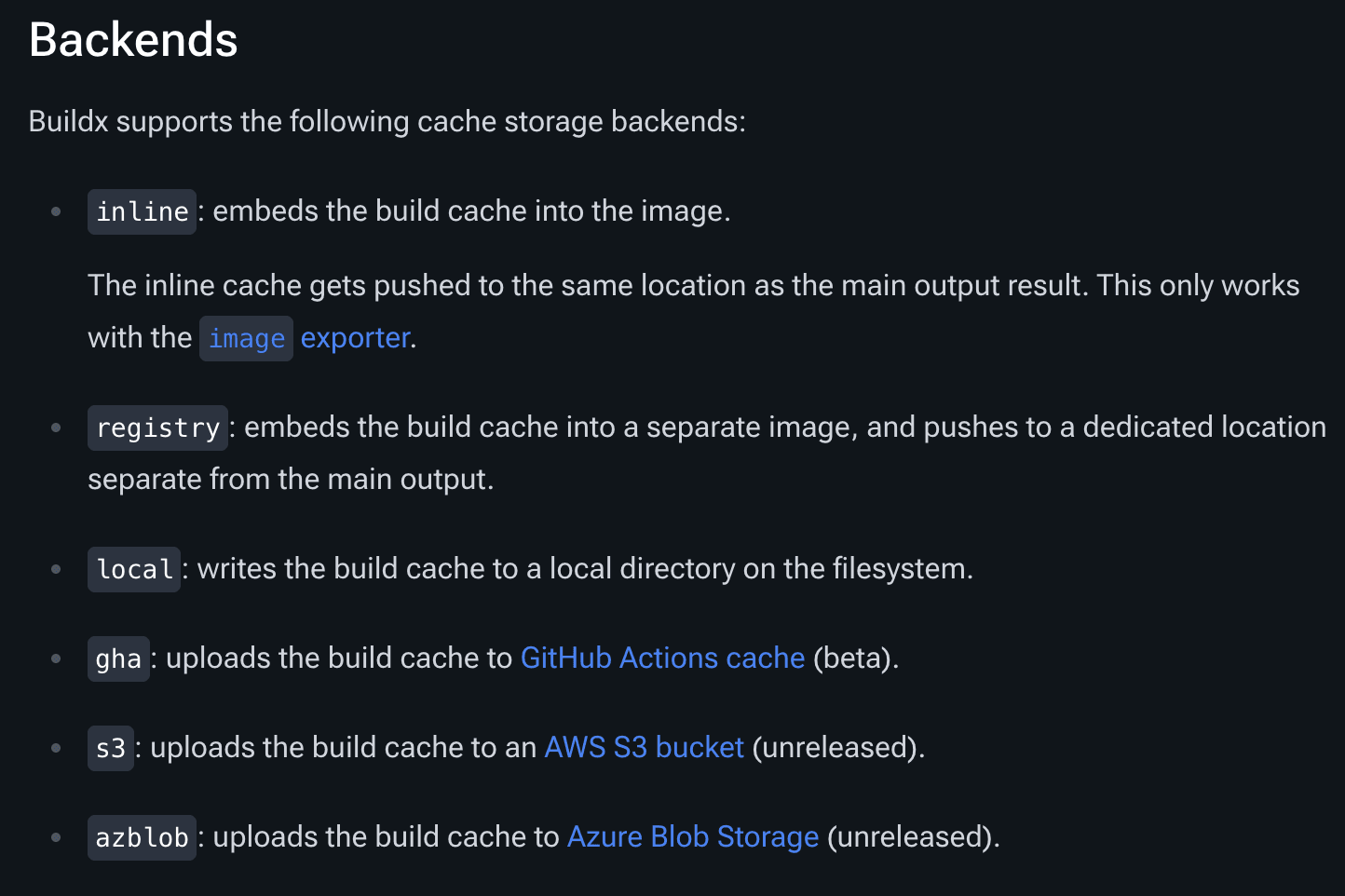
##### 建立 cache #####
tree
.
├── main.c
├── Makefile
└── Dockerfile

CACHE_IMAGE=$CI_REGISTRY_IMAGE:cache
buildctl-daemonless.sh build \
    --frontend dockerfile.v0 \
    --local context=. \
    --local dockerfile=. \
    --export-cache type=registry,ref=$CACHE_IMAGE \
    --import-cache type=registry,ref=$CACHE_IMAGE \
    --output type=image,name="myimage:latest",push=true

##### 建構多平臺 #####
buildctl-daemonless.sh build \
    --frontend dockerfile.v0 \
    --local context=. \
    --local dockerfile=. \
    --opt platform=linux/amd64,linux/arm64 \
    --output type=image,name="myimage:latest",push=true

##### 參數帶入 #####
buildctl-daemonless.sh build \
    --frontend dockerfile.v0 \
    --local context=. \
    --local dockerfile=. \
    --build-arg no_proxy=$no_proxy \
    --output type=image,name="myimage:latest",push=true
GitLab-CI 範例
build:
  stage: build
  image: moby/BuildKit:rootless
    name: BuildKit
    entrypoint: [""]
  variables:
    DOCKERFILE_PATH: "build/Dockerfile"
    CACHE_IMAGE: $CI_REGISTRY_IMAGE:cache
    BuildKitD_FLAGS: --oci-worker-no-process-sandbox
  script:
    - !reference [.docker-login]
    - !reference [.prepare-image-name]
    - |
      buildctl-daemonless.sh build \
        --frontend dockerfile.v0 \
        --local context=. \
        --local dockerfile=. \
        --opt filename=${DOCKERFILE_PATH} \
        --export-cache type=registry,ref=$CACHE_IMAGE \
        --import-cache type=registry,ref=$CACHE_IMAGE \
        --output type=image,name=$IMAGE_WITH_TAG,push=true
  allow_failure: false
指令參數說明
Docker context: 讓 Docker 知道能 access 的檔案範圍
docker build [OPTIONS] PATH | URL
                       ^^^^^^^^^^
📌 關鍵字:Docker BuildKit、Kaniko 替代方案、buildctl、daemonless、GitLab CI、container build、Docker cache、multi-platform build、moby/BuildKit、CI/CD pipeline、buildx
在自建 n8n 為 Workflow 建版控:自動同步到 GitLab(Create / Edit 節點)
以自建的 n8n 為核心,透過 HTTP 取回 Workflow、整理欄位後推送至 GitLab,實作「Create File / Edit File」兩條版控流程;內含 API 金鑰設定、GitLab PAT 權限、避免空提交與完整 workflow JSON。
用 n8n 自動追蹤工具更新並發送 Slack 通知:開發依賴安全監控流程實作
透過 n8n 自動化追蹤開發工具與依賴的最新版本更新,偵測包含 Bug Fix 的 Release,並自動發送 Slack 通知。文章包含實際 workflow JSON、程式碼節點正則處理與自動化邏輯設計。